Thursday, March 1, 2018

Effective Way for Dealing Dead Cell Phone


The dead cell phone may be caused by many reason, but when it was broken and in dead situation, what you will do? how will you deal it? change an new one or fix it? In this article, VIPFIX will teach you some efficient way to solve this problem.Some professional cell phone repair tools will be required. Hope it will be helpful for you!

Okay, let us start our repair process:
- Take out the battery and see if it is charged. Use the phone repair multimeter to check the voltage. The voltage must be above 3.7 volts. Apply a battery booster to increase battery power and recharge it again.

- Check and clean the battery connector and the battery  point to remove carbon deposits. if it doesn't work, then replace the battery connector.

- Insert the charger to check whether the battery is charging. If there is a "battery charging" icon, but the phone does not turn on, check the power on/off switch. The voltage of the switch must be 2.5 to 3.5 V. Clean or replace the switch. Check whether the switch needs a jumper to help.

- If the phone can't turn on after the software is reflashed, heat CPU, power IC and flash IC.

- If there is no voltage on the power on/off switch, check whether the track to see whether it needs a jump wire.

- If the problem is not solved, reball or replace the power IC and CPU to solve the problem.

After we finished the above process, if your phone still can't open, maybe you can come to our official WEB to see the reason. Another, we still are very glad to share our repair tool with you guys, amazon shop and so on.

Wednesday, February 28, 2018

why your phone screen broken again?

With the smart phone becomes more and more popular , the more problem appears, we will share an article about the process which teach us how to repair and protect our phone.Whether you have dropped your handset on the sidewalk or someone else smacked it out of your hands,we believe this article will be useful for your iPhone using,even more.

Once your iPhone happened damaged, do you know how you should do next? We will share one of situation about the LCD screen broken.First of all, assess the damage, and that means getting your phone on a solid surface and in a good light, not just giving it a quick once-over before stuffing it back in your pocket.

With a little bit of stress testing and careful prodding you should be able to work out whether the screen is about to fall off or fail completely. In a lot of cases it will stay in place, cracks and all, so you can at least keep tweeting, so long as the screen is still visible and functioning.

More,it's difficult to completely eliminate the risk of smashing your phone screen, no matter how careful you are with it. Leaving it at home in a desk drawer kind of defeats the point of having a mobile phone in the first place.

Should a smashed screen prompt you to go for an upgrade, don't just throw your old phone away. Send it to a local recycling scheme, or try and sell it through Amazon—there are plenty of people who'll be willing to buy a smashed phone, because they'll do the repairs themselves, then sell it for a profit.


Until phones become unbreakable, though, you can still recover from a smashed screen without too much drama. It just might cost you a buck or two.

Sunday, February 11, 2018

Introduce iPhone 6 No Backlight Fault and Solve it

Got the same default :
iPhone Touch Screen can't display while the screen shows good and motherboard can work normally.
The first step we do still is to check the motherboard to get the current and current, it shows normally, so we have to check other's part.

Fix Process:
First use DC power supply to measure the boot current on iPhone, the boot current is normal. Tilt the iPhone screen, we can see the Apple LOGO, which means the iPhone 6 is not no display but without the backlight.

Remove the iPhone motherboard and measure the resistance of display socket backlight circuit and backlight power supply by Fluke 15B+ Digital Multimeter, we found the data of backlight power supply only has 97, but the normal data is more than 400.


Picture 14-12-1
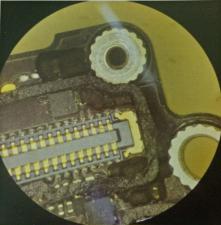
Take off the iPhone CPU shield to check the components near the backlight. After check it under the VGA Camera 7-45X Trinocular Stereo Microscope, it was found that the backlight diode had been burnt, and the big inductance also is cracked and discolored. In this case, the elements on the back light path should all be damaged, we need to remove all components and replace the new.


Picture 14-12-2
After replacement, turn on iPhone to test, now the iPhone screen displays normally, the repairs end!
 
Picture 14-12-3

Friday, February 9, 2018

Fix iPhone 6S No Service

Fault Description and Possibility Reason:
Fault: iPhone 6S no service and no signal
Possibility Reason: Signal receiving part or signal transmitting part damaged.
We confirmed the fault , boot it and check the security setting. Ready to start our repair process.


14-11-1

The iPhone 6s has no service with sim card but it shows operator in the setting, which indicating that there is no problem on the signal reception, so we judge the fault is on the signal transmitting part.

The signal transmitting part is sent out from the RF IC chip through the 2G amplifier chip and then through the iPhone antenna switch chip.

In iPhone repairs, the 2G power amplifier failure probability is very high, so we replace the iPhone 6 2G amplifier U2GPA_RF chip by QUICK 861DW hot rework station and related professional repair tools, but the same failure is still existing, it seems that the 2G amplifier has no problem.

So we have to transfer previous judgement, now we are going to to replace the iPhone 6S radio frequency IC U _WTR_RF chip, it finally shows normal, and also normal for calling or receiving calls.
14-11-2


14-11-3

Therefore, it is found that the RF IC U_WTR_RF chip damage can also cause cell phone has no service. 

Thursday, February 8, 2018

Deal iPhone 6 No Display As of Screen Replaced

After changing a new screen, the iPhone 6 can't display, maybe most of us happens this situation, this article aims to provide a efficient way. We have to disassemble it, we connected it with DC Power supply, the diode data of display socket and iPhone display IC output are normal. But when we check the motherboard current output, the value shows abnormal, so we doubt there exist some failure in motherboard.

The current reached 100mA when press the power button. After remove the display tube, the current still the same, which means there is a short circuit. Measure the voltage output of each circuit of power supply with Fluke 15B+ Digital Multimeter, then surprised to find that there are really short circuit places.

LD010 is short circuit; we suspect that the filter capacitance on the circuit has been penetrated. After remove the iPhone power control IC, we found it is ground short circuit. Open the WUXINJI Dongle to check the iPhone schematic circuit, we found that this circuit is the display card image transmission MIPI data bus power supply.


Picture 14-10-1

CPU breakdown, the iPhone 6 doesn't display is possibly caused by physical damaged that the iPhone display screen electrostatic breakdown the CPU internal video card part. Put it under the 7-45X 180X Stereo Zoom Microscope, adjust the stable voltage to 1.5V, and then shock this circuit. At the shock moment, the power meter current jumps to more than 500 mA and then becomes 0. Shock it again, the current is not responding. Measuring the diode data shown is 180.


Picture 14-10-2

Install the main power, and then connect it to DC power supply to turn it on, the current not start from 100mA, but start from normal data 60mA. Assemble the iPhone display screen to test; now the iPhone 6 can be displayed normally.


Picture 14-10-3

Wednesday, February 7, 2018

Entirely Way for iPhone 6S Plus No Sound

The next repaired iPhone occurred no sound failure ,but it can be heart when plugging earphone, and we know the ring bell doesn't vibrate through the attached file. So let us start our repair process:
Picture 14-9-1
The first step is to judge the fault, if there is no speaker voice when playing music on iPhone, generally the fault is caused by iPhone audio amplifier chips. There are 2 Audio Power Amplifiers: U3700 and U3800.
Which chip is out of problem? The previous test has said that the vibration function is not normal. The vibration function is managed by U3800 chip. Therefore, we remove the U3800 chip to measure the ground resistance of the chip pad. It is found that the E7pin I2S_AP_TO_ARC_MCLK  ground resistance is infinitely great.

In WUXINJI schematic diagram, it is known that the signal passes through the R0921 resistance to the iPhone 6s Plus CPU.
Picture 14-9-2
In the measurement, it is found that the CPU solder joint is broken down to the R0921 resistance layer. It is not easy to dig the route on the plate layer, so we try to borrow the 12S_AP_TO_CODEC_MCLK signal of the audio IC chip,soldering jumper wire from the R0920 resistance to the R0921 resistor.
Picture 14-9-3
Picture 14-9-4

Install to test, the sound is playing normal, vibration becomes normal and the sound of recording is also normal now! 

Tuesday, February 6, 2018

Repair iPhone 6 Plus No Rear Camera While No Flashlight

According to the attached file, we know the iPhone 6 Plus occurred the  rear camera won't open while flashlight can't be turned on.Usually one of them happens some fault , there will be a big possibility to cause another one can't work normally. So we need to disassemble it to confirm the fault source.

Picture 14-8-1


Picture 14-8-2
Use JM-P01 Essential Phone Repair Toolkit to remove the iPhone motherboard, and observe it under the 7-45X 180X Stereo Zoom Microscope, we found the U3200 chip had traces of moldy by water.


Picture 14-8-3
 With the help of QUICK 861DW and Precision Titanium Alloy Tweezers, we remove the chip smoothly and quickly. And then we found out that the U3200 chip 4-pin pp_vcc_main powered pin had corroded.


Picture 14-8-4
Measure the diode data of this pin with Fluke 15B+ Digital Multimeter, it is infinitely large. Check the iPhone schematic diagram found that PP_VCC_MAIN is through the FL3202 inductance input to the U3200 chip 4 pin. The FL3202 inductance has been corroded under the microscope observation.


Picture 14-8-5
 Here it means we finished the repair process, and now we need to mend the U3200 Power supply IC well to install iPhone and test. We can see the fault was repaired, the function shows well.That's ending